


Portenta Vision Shield - LoRa® - ASX00026
Portenta Vision Shield LoRa® mang các tính năng chuẩn công nghiệp đến Portenta của bạn. Phần cứng bổ sung này cho phép bạn chạy các ứng dụng thị giác máy tính nhúng, kết nối không dây qua LoRa® tới Arduino Cloud hoặc hạ tầng riêng của bạn, và kích hoạt hệ thống khi phát hiện sự kiện âm thanh.
Shield đi kèm:
- cảm biến camera 320x320 pixel: dùng một trong các lõi của Portenta để chạy thuật toán nhận dạng hình ảnh bằng trình soạn thảo OpenMV cho Arduino
- kết nối không dây LoRa 868/915MHz tầm xa: kết nối Portenta H7 của bạn với Internet vạn vật với mức tiêu thụ điện thấp
- hai micro trên bo mạch để phát hiện âm thanh có hướng: thu và phân tích âm thanh theo thời gian thực
- Đầu nối JTAG: gỡ lỗi mức thấp cho bo mạch Portenta hoặc cập nhật firmware đặc biệt bằng bộ lập trình ngoài
- Đầu nối thẻ SD: lưu dữ liệu thu thập vào thẻ, hoặc đọc các tệp cấu hình
Vision Shield LoRa® được thiết kế để hoạt động với Arduino Portenta H7. Các bo mạch Portenta có bộ xử lý ARM® Cortex® 32-bit đa lõi chạy ở hàng trăm megahertz, với hàng megabyte bộ nhớ chương trình và RAM. Các bo mạch Portenta có WiFi và Bluetooth®.
Hãy mua shield này cùng Portenta H7 để có hiệu năng đầy đủ.
Thị giác máy tính nhúng thật dễ dàng
Arduino đã hợp tác với OpenMV để tặng bạn giấy phép miễn phí cho OpenMV IDE, cách dễ dàng để bước vào thị giác máy tính bằng MicroPython làm mô hình lập trình. Hãy tải OpenMV for Arduino Editor từ trang hướng dẫn chuyên nghiệp của chúng tôi và xem các ví dụ chúng tôi đã chuẩn bị sẵn trong OpenMV IDE. Các công ty trên khắp thế giới đã xây dựng sản phẩm thương mại dựa trên cách tiếp cận đơn giản nhưng mạnh mẽ này để phát hiện, lọc và phân loại hình ảnh, mã QR và nhiều thứ khác.
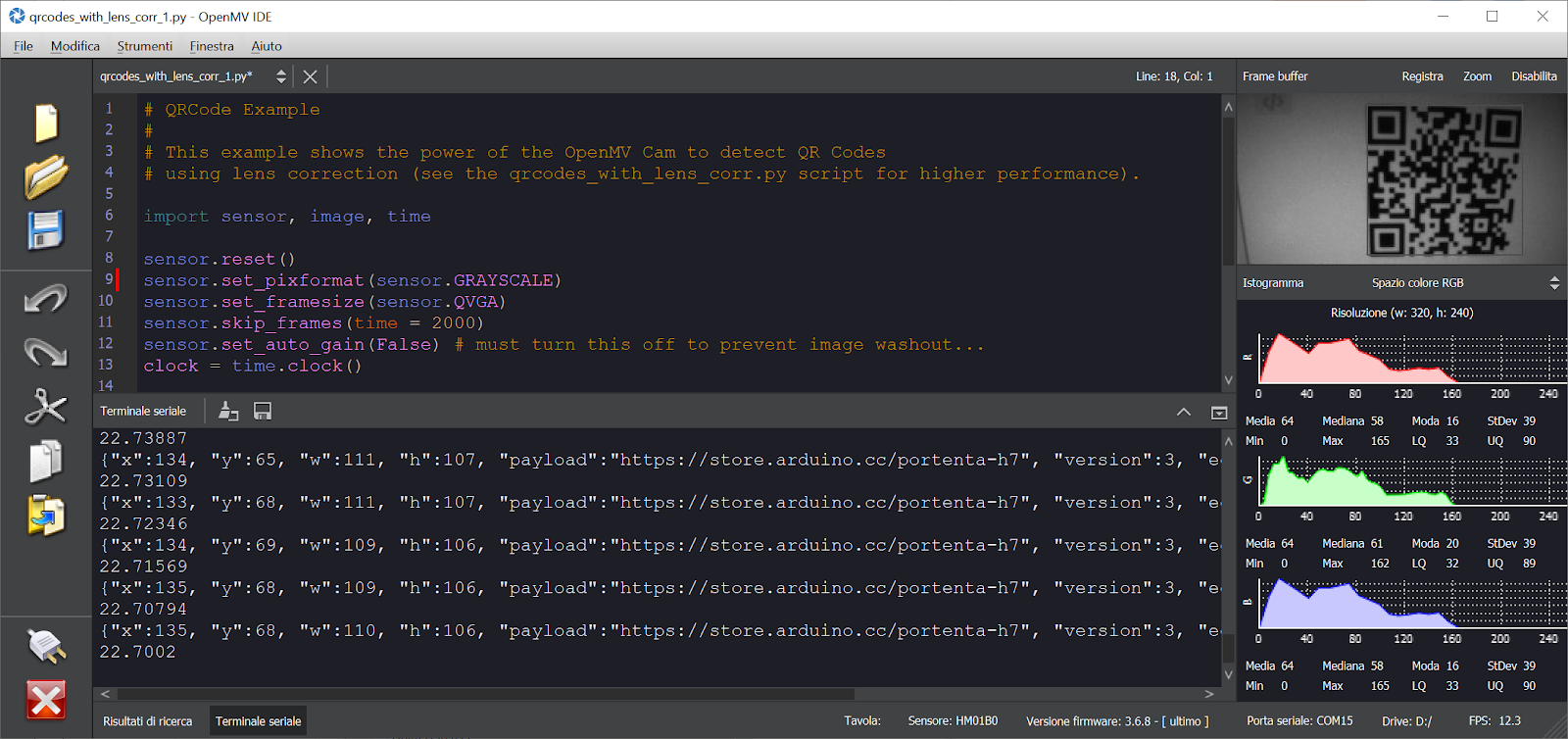
Ví dụ phát hiện mã QR
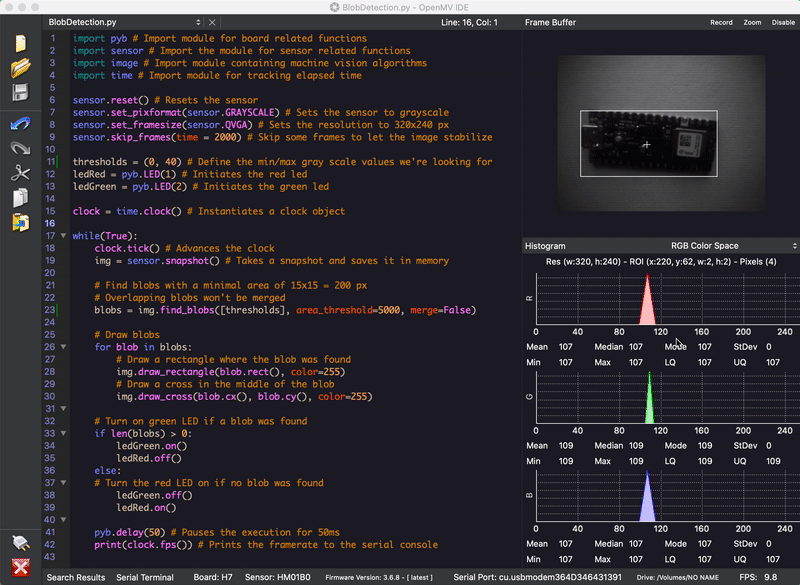
Ví dụ phân tích blob
Gỡ lỗi bằng công cụ chuyên nghiệp
Kết nối Portenta H7 với bộ gỡ lỗi chuyên nghiệp qua đầu nối JTAG. Dùng các công cụ phần mềm chuyên nghiệp như của Lauterbach hoặc Segger trên bo mạch của bạn để gỡ lỗi mã từng bước. Vision Shield đưa ra các chân cần thiết để bạn cắm JTAG ngoài.
Bắt đầu sử dụng
Mục hướng dẫn Portenta trên website Arduino Pro chứa mọi thông tin bạn cần để cấu hình Portenta H7, cũng như Vision Shield LoRa® và trình soạn thảo OpenMV cho các ứng dụng thị giác máy tính.
Cần trợ giúp?
Hãy xem Diễn đàn Arduino để đặt câu hỏi về ngôn ngữ Arduino hoặc cách thực hiện dự án của riêng bạn với Arduino. Nếu cần hỗ trợ về bo mạch, vui lòng liên hệ bộ phận Hỗ trợ người dùng chính thức của Arduino như hướng dẫn tại trang Liên hệ.
Bảo hành
Bạn có thể xem thông tin bảo hành của bo mạch tại đây.
The Portenta Vision Shield LoRa® brings industry-rated features to your Portenta. This hardware add-on will let you run embedded computer vision applications, connect wirelessly via LoRa® to the Arduino Cloud or your own infrastructure, and activate your system upon the detection of sound events.
The shield comes with:
-
a 320x320 pixels camera sensor: use one of the cores in Portenta to run image recognition algorithms using the OpenMV for Arduino editor
-
long range 868/915MHz LoRa wireless connectivity: get your Portenta H7 connected to the Internet of Things with low power consumption
-
two on-board microphones for directional sound detection: capture and analyse sound in real-time
-
JTAG connector: perform low-level debugging of your Portenta board or special firmware updates using an external programmer
-
SD-Card connector: store your captured data in the card, or read configuration files
The Vision Shield LoRa® has been designed to work with the Arduino Portenta H7. The Portenta boards feature multicore 32-bit ARM® Cortex® processors running at hundreds of megahertz, with megabytes of program memory and RAM. Portenta boards come with WiFi and Bluetooth®.
Purchase this Shield together with the Portenta H7 for full performance.
Embedded Computer Vision Made Easy
Arduino has teamed up with OpenMV to offer you a free license to the OpenMV IDE, an easy way into computer vision using MicroPython as a programming paradigm. Download the OpenMV for Arduino Editor from our professional tutorials site and browse through the examples we have prepared for you inside the OpenMV IDE. Companies across the whole world are already building their commercial products based on this simple-yet-powerful approach to detect, filter, and classify images, QR codes, and others.
QR code detection example
Blob analysis example
Debugging With Professional Tools
Connect your Portenta H7 to a professional debugger through the JTAG connector. Use professional software tools like the ones from Lauterbach or Segger on top of your board to debug your code step by step. The Vision Shield exposes the required pins for you to plug in your external JTAG.
Getting Started
The Portenta tutorials section at the Arduino Pro website contains all the information you need to configure the Portenta H7, as well as the Vision Shield LoRa®, and the OpenMV editor for computer vision applications.
Need Help?
Check the Arduino Forum for questions about the Arduino Language, or how to make your own Projects with Arduino. Need any help with your board please get in touch with the official Arduino User Support as explained in our Contact Us page.
Warranty
You can find here your board warranty information.